Projects List View
The Projects List provides a comprehensive overview of all projects in the system, allowing you to view, filter, and manage projects across different stages of their lifecycle.
Accessing Projects List
To access the Projects List:
- Navigate to the Project Management module from the main sidebar
- Click on Projects to view the projects list interface
- The list displays all projects you have access to based on your OPCO.
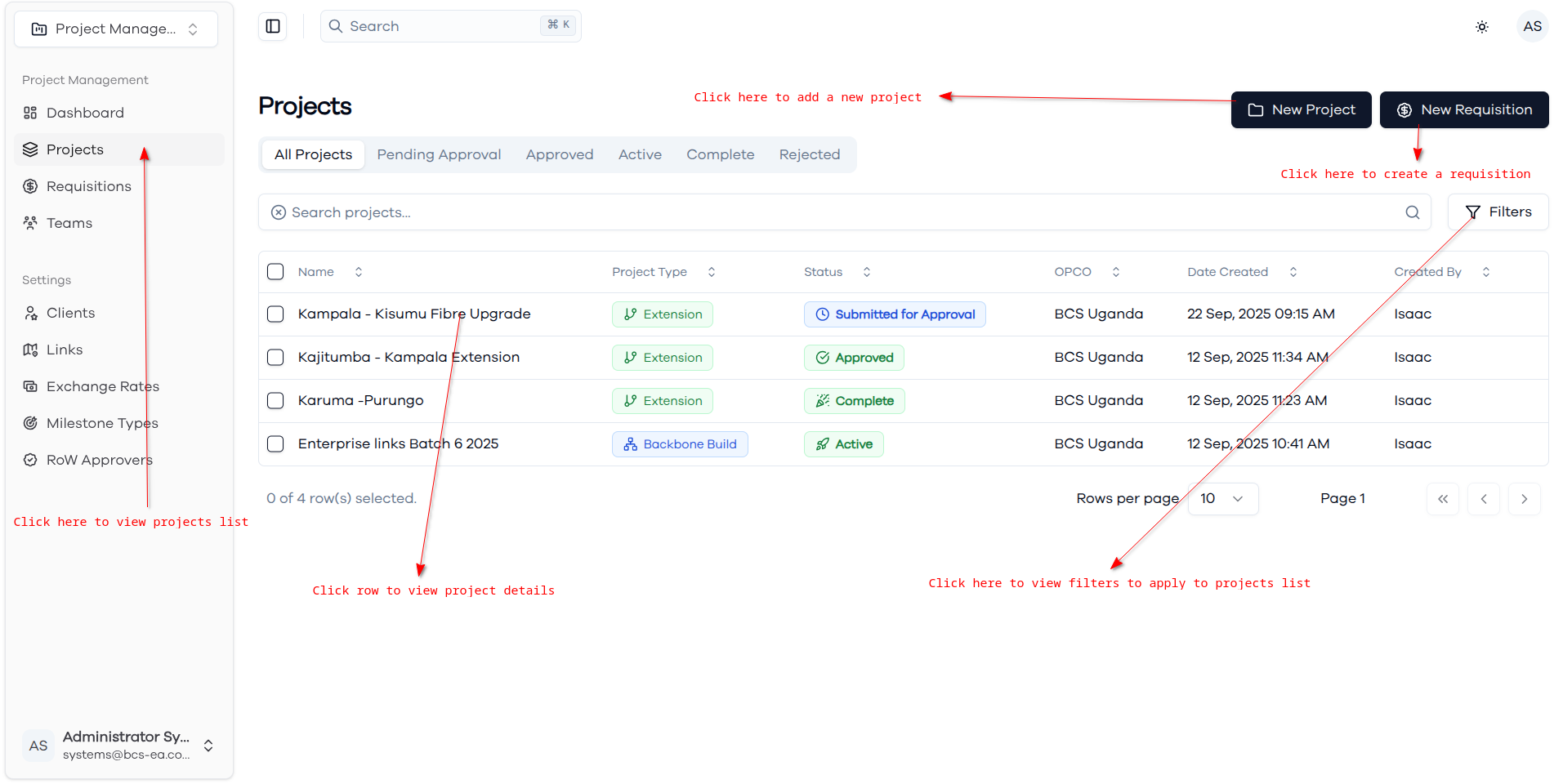
Interface Overview
Top Action Bar
The header section contains key action buttons:
- New Project Button: Click to initiate the project creation wizard
- New Requisition Button: Create new project-related requisitions
- Search Bar: Search for specific projects by name or other criteria
- Filters Button: Apply advanced filters to refine the project list
Project Status Tabs
Projects are organized into status-based tabs for easy navigation:
- All Projects: View all projects regardless of status
- Pending Approval: Projects awaiting Line Managers' approval
- Approved: Projects that have been approved and are ready for execution
- Active: Currently executing projects
- Complete: Finished projects
- Rejected: Projects that were not approved
List Management Features
Pagination:
- Rows per page: Adjust number of projects displayed (default: 10)
- Page navigation: Navigate through multiple pages of projects
Search and Filter:
- Search projects: Use the search bar to find specific projects
- Filters: Click the Filters button to apply advanced filtering criteria
- Real-time filtering updates the list as you type
Project List Actions
Viewing Project Details
- Click on any project record to access detailed project information
Creating New Projects
- Click New Project to start the project creation wizard
- Follow the step-by-step process: Project Info → Links → BOQ → Budget
Managing Requisitions
- Click New Requisition to create project-related expense requests
- Link requisitions to specific projects for budget tracking
Filtering Projects
- Use status tabs for quick filtering by project stage
- Apply advanced filters for more specific criteria
- Combine multiple filters for precise project selection