BCS Enterprise Resource Planning (ERP) System
Welcome to the BCS ERP system guide. This comprehensive enterprise resource planning solution is designed to streamline and integrate BCS core business processes across project management, finance, inventory, and procurement operations.
System Architecture Overview
The BCS ERP system consists of interconnected modules that work together to provide end-to-end business process management:
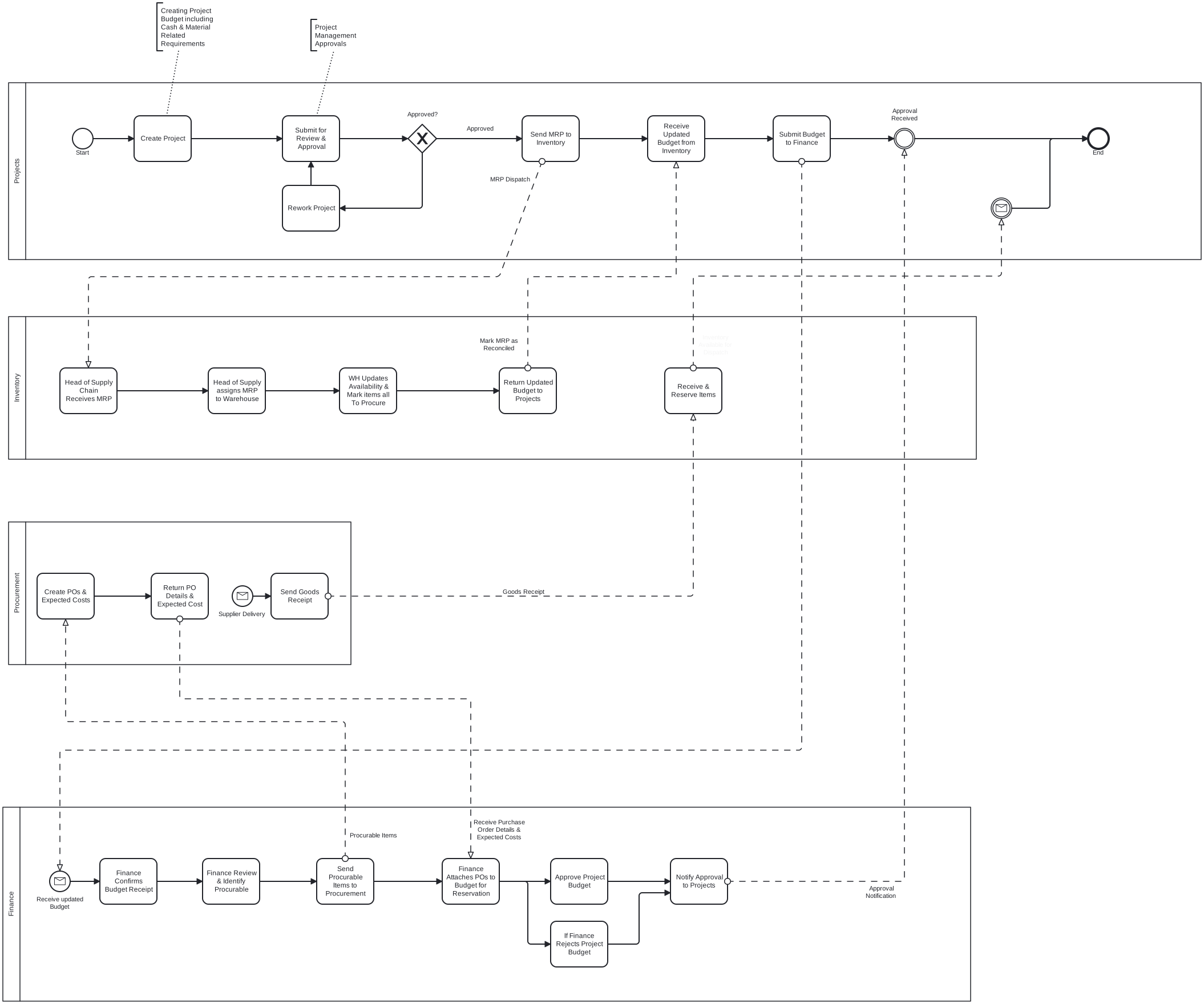
Core Modules
Project Management Module
The Projects Module serves as the central hub for project lifecycle management, encompassing:
- Project Creation & Setup: Complete project inception from initial information gathering through budget configuration
- Project Approvals: Structured approval workflows for project authorization
- Material Resource Planning (MRP): Integration with inventory for project material requirements
- Cash Resource Budgeting: Comprehensive budget planning and cost management
- Project Execution Tracking: Real-time monitoring of project progress and resource utilization
Inventory Management Module
The Inventory Module provides comprehensive warehouse operations and material management through specialized submodules:
- Warehouse Operations: Multi-location inventory tracking and management
- Inventory Items Management: Product catalog, categorization, and specifications
- Material Resource Planning: Material planning and supply chain coordination
- Stock Tracking: Real-time inventory levels, movements, and availability
- Supply Chain Management: Vendor relations, procurement coordination, and delivery tracking
Finance Management Module
The Finance Module handles all financial aspects of project and operational management:
- Project Budget Management: Receipt, review, and approval of project budgets
- Cash Requisitions Processing: End-to-end requisition workflow from creation to disbursement
- Financial Controls: Budget oversight, expense approvals, and financial compliance
- Cost Tracking: Real-time project cost monitoring and variance analysis
- Financial Reporting: Comprehensive financial analytics and reporting capabilities
Purpose of This ERP Guide
This guide establishes a formal, cross-functional reference for project-related business processes within the ERP system. The guide standardizes how processes are:
- Initiated: Proper process entry points and requirements
- Executed: Step-by-step workflow procedures
- Reviewed: Quality assurance and validation checkpoints
- Approved: Authorization workflows and approval hierarchies
- Handed Off: Inter-departmental process transitions
This standardization ensures consistency, control, and auditability across all business functions including Projects, Finance, Inventory/Warehouse Management, and Procurement.
Key System Benefits
Integrated Operations
- Seamless Data Flow: Real-time information sharing across all modules
- Elimination of Silos: Unified system reduces departmental barriers
- Consistent Processes: Standardized workflows across all business functions
Enhanced Control & Visibility
- Real-Time Reporting: Live dashboards and analytics for all operations
- Audit Trails: Complete transaction history and accountability
- Approval Workflows: Structured authorization processes with proper controls
Improved Efficiency
- Automated Processes: Reduced manual intervention and human error
- Streamlined Workflows: Optimized processes for maximum efficiency
- Resource Optimization: Better allocation and utilization of resources
Financial Oversight
- Budget Controls: Comprehensive budget management and variance tracking
- Cost Management: Real-time cost tracking and financial analysis
- Compliance: Built-in controls for financial and operational compliance
Getting Started
To begin using the BCS ERP system effectively:
- Understand Your Role: Identify which modules are relevant to your responsibilities
- Review Process Flows: Familiarize yourself with the workflows that affect your work
- Access Training: Utilize the detailed guides for each module
- Follow Standards: Adhere to the established processes and approval workflows
Each module guide provides detailed step-by-step instructions, best practices, and troubleshooting guidance to ensure successful system utilization.
- Clear steps for new users to begin using the system effectively
- References to detailed module guides
This overview will help users understand the complete ERP ecosystem before diving into specific module guides, ensuring they have proper context for how all the pieces work together.
Need Help?
If you encounter any challenges while using the BCS ERP system:
- Contact any System Administrator: Reach out to any available system administrator for immediate assistance
- Email Support: Send your queries to systems@bcs-ea.com and our support team will handle your request promptly
Our support team is committed to ensuring you have a smooth experience with the ERP system.